
Blazor Web App
As a new project I am building a piece of software on the bleeding edge again! This is a web application that should still be usable when offline and sync any actions (like adding or editing records) when back online. A perfect project to try out a Progressive Web App (or PWA) with Blazor!
Project setup
We created the project in Visual studio, by creating a Blazor WebAssembly App project and checking the Progressive Web App checkbox. Lots more and better information in the Microsoft docs. We also created a Web API project to perform the server side operations of the web app. By including the Blazor project into the Web API project, we can easily run and debug them together.
Deploying manually
Next up: how to deploy? We want to run this as an Azure Web App eventually. Setting up the service is trivial, with a minimal application plan this will work. Deploying is possible using Visual Studio by clicking the Publish button.
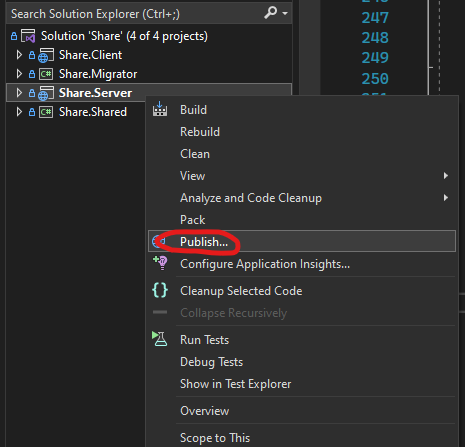
Clicking this button the first time will take you to set up publishing the project to several kinds of targets, like Azure, IIS, Docker Registry or a folder. However, we don’t want to deploy through Visual Studio, but through a proper Continuous Integration pipeline. Enter Azure DevOps.
Azure DevOps
The code is hosted in an Azure DevOps repository, so the easiest way to deploy is to create a pipeline and a release. The .NET Core YAML template when creating a new release looks promising:
- Use
VsBuildto build the solution with areleaseconfiguration - Run any unit tests that are discoverable in the solution.
Any stuff we want to deploy can be found in the staging directory. So, lets build a Release pipeline with this. With the Azure App Service template it is easy to deploy it to our service. Hook up the artifact of the pipeline to the release, set it to trigger every time the pipeline completes and we are good to go, right?
dotnet publish
Unfortunately, no. In the beginning, it seemed to work just fine, but later it seemed that the changes in the Blazor app were not published properly, while the changes on the server app did work well. What happened? As it turns out, the initial code was deployed using Visual Studio, which deployed both the Blazor app as the server app correctly. The build pipeline would build the solution correctly, but not set the dependencies correctly. The Blazor App would be build, but published separately instead of being bundled into the server app. Confusion all around! I found out by comparing the created artifacts with the deployed files. The artifact that was created was around 50 Mb, while the deployed files were a total of 100Mb. Big difference! This issue could be solved easily by changing the pipeline definition:
- Restore all NuGet packages (
dotnet restore) - Build all projects (
dotnet build) - Publish the Server app (
dotnet publish Server.csproj). Due to the defined dependency, the Blazor app built in step 2 was also included in the output - Publish the created artifacts
After making this change, the build would be deployed correctly as a whole again.